3 models in this file
Which Bambu Lab 3D Printer Should You Buy?

As Amazon Associates, we earn from qualifying purchases. This means we may receive a small commission at no extra cost to you if you click through and make a purchase.
Bambu Lab built its name on fast, heavily automated FDM printers that are ready to print within minutes of unboxing. Where older hobby printers asked you to level beds by hand and tune settings for every spool, Bambu Lab machines calibrate themselves, read filament settings from RFID tags and pair with the AMS (Automatic Material System) for multi-color printing. For makers working off a small desk or shuffling a printer between a spare room and a garage, that automation means less re-tuning every time the machine moves.
This guide covers the open-frame A1, the enclosed P1S Combo with AMS, the newer P2S on its own and as a Combo with AMS 2 Pro, and Bambu Lab’s own PLA Matte filament. The printers differ mainly in enclosure, speed and multi-color support, and their footprints and weights vary more than you might expect for machines that look similar in photos.
The line-up at a glance
Bambu Lab 3D Printers Compared
| Model | Listed dimensions | Listed weight | Top speed or acceleration | Multi-color |
|---|---|---|---|---|
| Bambu Lab P1S Combo | 18.72 x 23.01 x 18.72 in | 47.5 lb | 500 mm/s, 20,000 mm/s² | Yes, AMS included |
| Bambu Lab P2S Combo | 18 x 22 x 18 in | 46.3 lb | 600 mm/s | Yes, AMS 2 Pro included |
| Bambu Lab A1 3D Printer | 21.76 x 20.83 x 12.87 in | 10 kg | 10,000 mm/s² | With AMS lite (sold separately) |
| Bambu Lab P2S 3D Printer | 18 x 21 x 18 in | 38.9 lb | 600 mm/s | No, Combo required |
| Bambu Lab PLA Matte Filament | Not listed | 1 kg | Not applicable | RFID for AMS |
No. 1 of 3 · Bambulab
Bambu Lab P1S Combo for Enclosed Multi-Color Printing
9.0/10 Our score

Best for: Enclosed multi-color printing with proven AMS
What the listing says
- Up to 16 Colors: Bring your designs to life with vibrant multi-color/multi-material printing capabilities, perfect for showcasing your creativity.
- 500mm/s and 20000 mm/s² Acceleration True High Speed: Don't wait around for your masterpieces.
- Enclosed Design Fully enclosed body improves print performance for advanced filaments.
- Set Up in 15 Minutes: Spend more time printing and less time setting up.
- Supported Filament Ideal: PLA, PETG, TPU, PVA, PET ABS, ASA; Capable : PA, PC; Not Recommended: Carbon/Glass Fiber Reinforced Polymer.
Pros
- AMS included for multi-color
- Fully enclosed body
- 500 mm/s top speed
Cons
- Heaviest at 47.5 pounds
- Not for carbon or glass fiber filament
The Bambu Lab P1S Combo pairs the P1S printer with an AMS unit. The listing highlights up to 16 colors (connecting Bambu Lab AMS units is required), a top speed of 500 mm/s with 20,000 mm/s² acceleration, a fully enclosed body that helps with advanced filaments, and automatic bed leveling. Bambu Lab says setup takes about 15 minutes.
Supported filaments are split into ideal (PLA, PETG, TPU, PVA, PET, ABS, ASA), capable (PA, PC) and not recommended (carbon or glass fiber reinforced polymers). The Combo measures 18.72 x 23.01 x 18.72 inches and weighs 47.5 pounds, the heaviest item in this lineup, with a metal build and black finish.
This suits hobbyists who want multi-color prints and an enclosure for ABS or ASA, and who have a permanent spot for the machine. If you want built-in filament drying or AI failure detection, the P2S Combo is the newer option at a similar footprint. Our Bambu Lab combo guide goes deeper on the AMS bundles.
No. 2 of 3 · Bambulab
Bambu Lab P2S Combo for the Newest Multi-Material Workflow
8.0/10 Our score
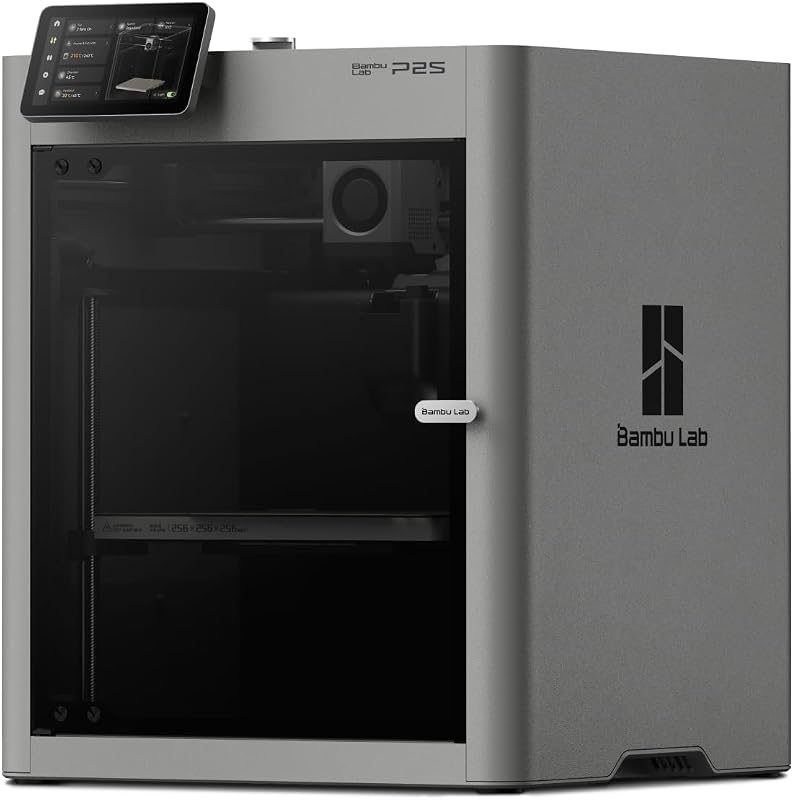
Best for: Single-color engineering filament printing
What the listing says
- High-Speed Precision The Bambu Lab P2S 3D printer prints up to 600 mm/s while maintaining exceptional accuracy.
- Ready to Print in 15 Minutes: Set up your P2S FDM 3D printer and start printing in just 15 minutes.
- Effortless Multi-Color Printing The AMS 2 Pro enables seamless multi-color/multi-material 3D printing.
- Smart Airflow for Any Filament: The Adaptive Airflow System automatically balances cooling and heat retention—keeping overhangs…
- Limitless Creativity, Seamless Workflow Explore over one million 3D models on MakerWorld and bring them to life with a smooth,…
Pros
- 50°C chamber with carbon filter
- 600 mm/s printing
- Lighter than P2S Combo
Cons
- No multi-color without Combo
- Still a large enclosed box
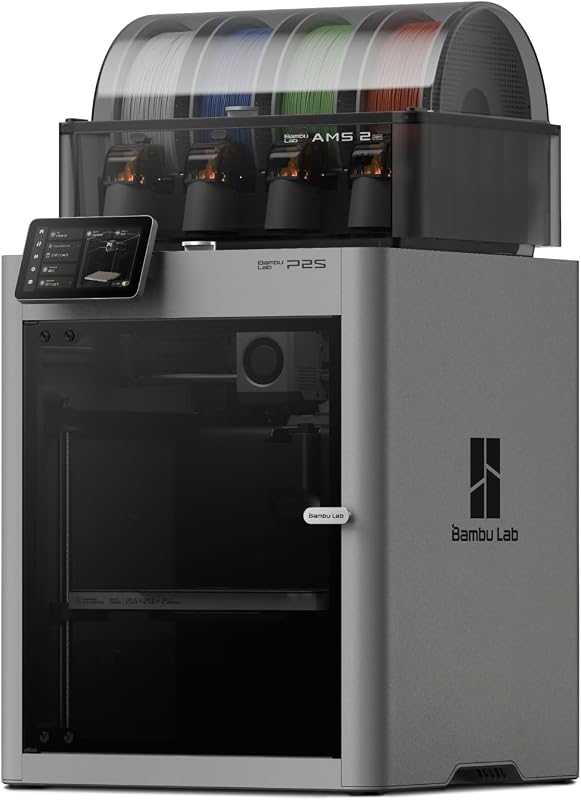
Best for: Makers wanting the newest multi-color setup
Pros
- AMS 2 Pro with 65°C drying
- 600 mm/s with servo extruder
- AI failure detection
Cons
- Large 18 x 22 inch footprint
- 3 pounds to move
The Bambu Lab P2S Combo bundles the P2S printer with the AMS 2 Pro. The printer reaches up to 600 mm/s and uses a PMSM servo extruder with active flow rate compensation for clean corners. Setup is listed at 15 minutes, and the feature list adds AI failure detection, quick-swap nozzles and automatic calibration.
The AMS 2 Pro adds built-in filament drying up to 65°C, which helps keep spools dry between sessions, a real advantage if the printer lives in a humid garage or gets moved around. An adaptive airflow system balances part cooling against heat retention and can hold a 50°C chamber for engineering materials, with a carbon filter to clean the air. It works with Bambu Studio, Bambu Handy and the MakerWorld model library. Listed dimensions are 18 x 22 x 18 inches at 46.3 pounds.
Choose this if you want every current Bambu Lab convenience in one box and print multi-color or multi-material parts regularly. If you only print one color at a time, the standalone P2S saves the AMS weight and space.
No. 3 of 3 · Bambulab
Bambu Lab A1 3D Printer for Beginners and Small Spaces
8.2/10 Our score

Best for: Beginners and small desks
What the listing says
- High-Speed Precision Experience unparalleled speed and precision with the Bambu Lab A1 3D Printer.
- Multi-Color Printing with AMS lite: Unlock your creativity with vibrant and multi-colored 3D prints.
- Full-Auto Calibration Say goodbye to manual calibration hassles.
- Active Flow Rate Compensation Achieve consistently smooth prints with active flow rate compensation.
- Easy and Quiet 3D Printing: Experience effortless printing with the Bambu Lab A1 FDM 3D printer.
Pros
- Lightest at 10 kg
- Full-auto calibration
- Quiet printing and quick-swap nozzle
Cons
- AMS lite sold separately
- No enclosure described
The Bambu Lab A1 3D Printer is the entry model, pitched at beginners and kids. It lists 10,000 mm/s² acceleration, full-auto calibration including Z-offset and bed leveling, active flow rate compensation, a simplified touchscreen, a 1-Clip quick-swap nozzle and quiet operation. Materials named include hardened steel, stainless steel and extruded aluminum.
Multi-color printing is possible, but only with the AMS lite, which is not included with this listing (the A1 Combo includes it). The listing does not describe an enclosure. Listed dimensions are 21.76 x 20.83 x 12.87 inches and the weight is 10 kg, far lighter than any P-series machine, which makes it the realistic choice if you carry the printer between rooms or to a makerspace.
This is the pick for a first printer, a shared family desk or anyone who prints mostly PLA. Makers who want to print ABS or ASA, which benefit from an enclosed chamber, should step up to the P1S or P2S.
From the notebook
Bambu Lab P2S 3D Printer for Single-Color Performance
The Bambu Lab P2S 3D Printer is the same printer as in the P2S Combo, without the AMS 2 Pro. It has the same 600 mm/s top speed, PMSM servo extruder, active flow rate compensation, AI failure detection, quick-swap nozzles, automatic calibration and adaptive airflow with a 50°C chamber and carbon filter.
The listing is explicit: the P2S alone does not support multi-color printing. It measures 18 x 21 x 18 inches and weighs 38.9 pounds, about 7.4 pounds lighter than the Combo, and it uses Bambu Studio and Bambu Handy like the rest of the lineup.
This fits makers who print functional parts in one material and want an enclosed, fast machine. Buying it alone makes sense if you plan to add multi-color later or never need it. For more on the standalone printers, see our Bambu Lab 3D printer overview.
From the notebook
Bambu Lab PLA Matte 3D Printer Filament for Everyday Prints
Best for: Clean matte prints on any Bambu printer
Pros
- RFID tag auto-loads settings
- 75mm ±0.03mm tolerance
- Reusable spool
Cons
- Single color per spool
- Matte finish not for glossy looks
The Bambu Lab PLA Matte 3D Printer Filament is a 1 kg spool of 1.75mm filament in Charcoal. The matte finish is non-glossy and minimizes glare, giving prints a soft, subdued look that hides layer lines better than shiny PLA. Bambu Lab lists a diameter tolerance of ±0.03mm and describes good layer adhesion without clogs, bubbles or tangles.
The spool carries an RFID tag with all printing parameters, which any AMS unit can read so you load and print without manual settings. It comes on a reusable spool, which Bambu Lab says cuts plastic waste by 20%.
Every printer above handles PLA, so this is an easy first spool for any of them. It is most convenient with an AMS-equipped Combo, where the RFID tag saves the most setup time.
Before you choose
How to Choose the Right Bambu Lab 3D Printer
Start with your space. The A1 is the lightest at 10 kg and the shortest at 12.87 inches tall. The P1S Combo and P2S Combo weigh over 46 pounds each and need a sturdy, permanent surface.
Decide on an enclosure. PLA and PETG print fine on the A1. For ABS, ASA or PC, the enclosed P1S or P2S is the better match, and the P2S adds a 50°C chamber with a carbon filter.
Settle the multi-color question now. The P1S Combo and P2S Combo include AMS units. The A1 needs AMS lite and the standalone P2S cannot print multi-color without the Combo version.
Think about filament care. If your printer lives in a damp space, the AMS 2 Pro’s 65°C drying is a practical reason to choose the P2S Combo. Regular maintenance matters too; see our guide to Bambu Lab lubricant oil.
Weigh setup time. Every printer here lists quick setup and automatic calibration, so moving a machine between rooms is less painful than with manual printers, but lighter is still easier.
Questions people ask
FAQ
Which Bambu Lab printer should a beginner buy?
The A1 is designed for beginners, with full-auto calibration and a simplified touchscreen, and it is the lightest option. Add AMS lite later if you want color.
What is the difference between the P1S and the P2S?
The P2S lists a higher 600 mm/s speed versus 500 mm/s, a servo extruder, AI failure detection, adaptive airflow with a 50°C chamber and, in the Combo, the AMS 2 Pro with filament drying.
Can the P2S print in multiple colors?
Only the P2S Combo. The standalone P2S listing states it does not support multi-color printing.
How many colors can the P1S Combo print?
The listing says up to 16 colors when connecting Bambu Lab AMS units. The Combo includes one AMS.
Does Bambu Lab PLA Matte work with all these printers?
PLA is supported across the lineup, and its RFID tag is read by the AMS for automatic settings.
How long does setup take?
The P1S Combo, P2S and P2S Combo listings all state about 15 minutes. The A1 listing describes it as ready to use.
Prices, specifications and the feature lines above are read from the product listing and can change without notice. Scores are out of 10, based on listed specifications and buyer feedback; nothing on this page is written from handling the product.


