4 models in this file
Looking for an UP 3D Printer? Consider These Multi-Color Models

As Amazon Associates, we earn from qualifying purchases. This means we may receive a small commission at no extra cost to you if you click through and make a purchase.
The UP brand earned recognition in desktop manufacturing by delivering straightforward, compact desktop machines that allowed hobbyists and engineers to turn digital CAD files into functional plastic prototypes without complex mechanical assembly. For years, shopping for an up 3d printer meant seeking reliability, small-footprint usability, and consistent single-filament output. However, as additive manufacturing has shifted toward high-speed motion systems, integrated multi-filament management, and automated calibration, many makers looking for modern up 3d printer alternatives find that the market has evolved toward native multi-spool ecosystems.
While none of the machines highlighted here bear the legacy UP badge, this 3d printer comparison examines four leading modern compact alternatives that deliver automated leveling, enclosed or CoreXY engineering, and multicolor printing capabilities suited for small maker spaces. Across this lineup, these four alternatives diverge primarily in whether their multi-color management comes native out of the box or requires an add-on module, their raw travel velocities, and their total footprint on your workbench.
The line-up at a glance
UP 3D Printers Compared
| Model | Multi-Color Support | Max Print Speed | Leveling System | Product Dimensions & Weight |
|---|---|---|---|---|
| Anycubic Kobra X Multicolor 3D Printer | Native 4-color; expandable to 19 colors with 4 ACE 2 Pro units | 600mm/s | LeviQ 3.0 49-point auto leveling | 23″D x 13″W x 22″H; 9.5 kg |
| FLASHFORGE AD5X Multi-Material 3D Printer 4-Color | Intelligent Filament System (IFS) 4-color built-in | 600mm/s | Full auto leveling multi-point sensor | 14.8″D x 16.26″W x 14.29″H; 10000 g |
| Creality K2 SE 3D Printer | Expandable multi-color (Creality CFS sold separately) | 500mm/s | One-tap fully automatic bed leveling | 13.98″D x 13.96″W x 18.98″H; 12.5 kg |
| Creality SPARKX i7 Nano Combo Multi‑Color | Multi-color combo with Auto Feed, Retract & Auto Refill | Not listed | Automatic bed leveling | 18.38″D x 16.65″W x 17.9″H; 9.72 kg |
No. 1 of 4 · Anycubic
Anycubic Kobra X Multicolor 3D Printer for High-Capacity Multi-Color
8.4/10 Our score

Best for: Makers wanting expandable multi-color printing capacity
What the listing says
- Newest Level – 19-Color with 4 ACE 2 Pro Why settle for one color when you can have multicolor?
- Savings 2X Time Stop wasting hours and filament on purging!
- Hardened Precision & High Speed Equipped with a high-durability hardened steel nozzle and vibration compensation, the Kobra X ensures every layer remains smooth.
- Flawless First Layer with LeviQ 3.0 The LeviQ 3.0 and auto bed leveling system uses a 49-point calibration and advanced leveling algorithm to ensure 100% bed flatness.
- Smart AI Monitoring & Large Model Library APP remote control, features Spaghetti detection and foreign object detection.
- Multi-Material Compatibility Supports mixed printing of rigid and flexible filaments including PLA, PETG, TPU, PVA, and ASA with…
Pros
- Native 4-color printing
- Expandable up to 19 colors
- LeviQ 3.0 49-point auto leveling
- Fast 600mm/s maximum speed
Cons
- Filament not included in package
- Larger 23-inch depth profile
The Anycubic Kobra X Multicolor 3D Printer is designed as an all-in-one multi-filament desktop powerhouse built for makers who demand expansive color capabilities without complex third-party modifications. Serving as an advanced alternative to traditional single-extruder setups, the anycubic kobra x arrives with native four-color printing capability straight out of the box. For makers who require even broader palettes for intricate models, figurines, or detailed prototyping, the system can expand up to 19 breathtaking colors using four optional ACE 2 Pro units. By engineering a shortened filament and machine travel path that cuts travel by 81.25 percent, this machine doubles processing speed and cuts material waste in half during color purging cycles, making multi-tone printing far less wasteful on filament.
Beyond its color handling, the mechanical core of the machine focuses on rapid throughput and high-temperature material handling. It features an all-metal construction finished in grey, equipped with a high-durability hardened steel nozzle capable of reaching temperatures up to 300℃, paired with built-in vibration compensation. These engineering choices allow the unit to run at a maximum printing speed of 600mm/s and complete a standard Benchy test model in just 14 minutes. First-layer consistency is governed by the LeviQ 3.0 auto bed leveling system, which runs a 49-point calibration routine using an advanced algorithm to secure complete bed flatness, allowing users to start printing within 15 minutes after unboxing. Multi-material flexibility extends across rigid and flexible filaments, supporting PLA, PETG, TPU, PVA, and ASA.
For remote monitoring and studio management, the unit incorporates an AI monitoring camera equipped with spaghetti detection and foreign object detection, connected through dual-band 2.4G and 5G Wi-Fi or wired LAN via the Anycubic App and Slicer. Users also gain access to a built-in library featuring 10,000 models. The innovative top-mount spool holder frees up horizontal desktop space, though users should note that the physical dimensions measure 23 inches deep, 13 inches wide, and 22 inches high with a machine weight of 9.5 kg. Additionally, the listing notes that filament spools shown in product images are for display only and must be purchased separately. This model is ideal for makers prioritizing large color capacity and high nozzle temperatures, though those needing a smaller desk footprint may look toward more compact alternatives.
No. 2 of 4 · Flashforge
FLASHFORGE AD5X Multi-Material 3D Printer 4-Color for Compact Workspaces
8.0/10 Our score

Best for: Workshops needing compact multi-material CoreXY speed
What the listing says
- Build for Speed and Full-Color Printing: Bring your creative vision to life with vibrant and multicolored 3D prints in 4-colors.
- Seamless Printing, Precise Control Full auto leveling sensor measures multiple points on the print bed to ensure consistent distance between nozzle and bed.
- Multi-Material and Multi-Color Capability: Intelligent Filament System (IFS) allows you to print in multiple colors and materials simultaneously.
- CoreXY Structure, Vibration Compensation With its all-metal motion CoreXY structure offers highly rigid, reducing the risk of errors caused by vibration or mechanical shifts.
- Compact Design, Space Saving With its lightweight, modular design and intelligent filament system (IFS), Four spools of filament arranged side…
Pros
- All-metal CoreXY motion structure
- Intelligent Filament System included
- 600mm/s speed with 20000mm/s² acceleration
- Side-by-side four spool arrangement
Cons
- Heavier 10 kg frame weight
- App model library not listed
The FLASHFORGE AD5X Multi-Material 3D Printer 4-Color offers a dedicated high-speed solution engineered specifically around a rigid motion structure and a streamlined physical footprint. Positioned as a strong contender when evaluating an up 3d printer alternative, the flashforge ad5x integrates Flashforge’s Intelligent Filament System (IFS) to enable simultaneous four-color and multi-material printing directly on the desktop. The machine arranges four spools side by side in a lightweight, modular format, allowing makers to optimize horizontal desk space. This configuration is supported by an all-metal motion CoreXY architecture that dampens vibrations and mechanical play during high-acceleration toolhead directional changes.
Operating performance is tuned for rapid output, boasting print speeds up to 600mm/s alongside an acceleration threshold of up to 20,000mm/s². To prevent layer alignment defects or ghosting at these velocities, the AD5X relies on active vibration suppression algorithms working alongside its rigid metal frame. Bed calibration is entirely automated through a full-auto leveling sensor that takes precise measurements across multiple points on the print bed, ensuring consistent nozzle standoff and uniform first-layer bonding. The listing highlights broad multi-material compatibility, allowing creators to run engineering and aesthetic filaments including standard PLA, flexible TPU, PETG, shiny SILK filaments, as well as reinforced blends like PLA-CF and PETG-CF.
With external dimensions measuring 14.8 inches deep, 16.26 inches wide, and 14.29 inches high, and an overall item weight of 10,000 grams (10 kg), the AD5X occupies a very manageable cubical footprint on small worktables. Its 1-click print functionality and automated filament backup ensure reliable continuous printing during intricate jobs. While it provides immediate four-spool printing, it does not offer the multi-unit expansion up to 19 colors found on the Anycubic platform. Makers who prioritize a rigid CoreXY frame, carbon-fiber filament readiness, and a tidy side-by-side spool layout will find this model exceptionally suited for productive home studios and educational spaces.
No. 3 of 4 · Creality
Creality K2 SE 3D Printer for Expandable CoreXY Speed
7.6/10 Our score
Best for: Users wanting rigid high-speed CoreXY printing
What the listing says
- 500mm/s High-Speed Fast Printing Driven by a lightweight CoreXY motion system, the Creality K2 SE delivers up to 500mm/s high-speed…
- 【Solid Metal Build—High Precision & Stable Printing】Featuring a die-cast aluminum alloy frame, corner gussets, and dual-side…
- 【Expandable Multicolor Printing—Compatible with Creality CFS】K2 SE is the upgrade of K1 SE 3d printer, the…
- 【Direct Drive Extruder with Upgraded Feeding System】The modular direct drive extruder enables accurate filament control for…
- 【Effortless Setup & Fully Automatic Leveling—Beginner-Friendly Experience】Enjoy a true out-of-the-box setup with just a 5-minute assembly.
- Large Build Volume The optimized build area offers the flexibility needed for functional parts, household models, figurines, and multi-component assemblies.
Pros
- Die-cast aluminum alloy frame
- Quick-swap direct drive nozzle
- 500mm/s speed with input shaping
- Rapid 5-minute initial assembly
Cons
- Multi-color CFS unit sold separately
- Heaviest unit at 12.5 kg
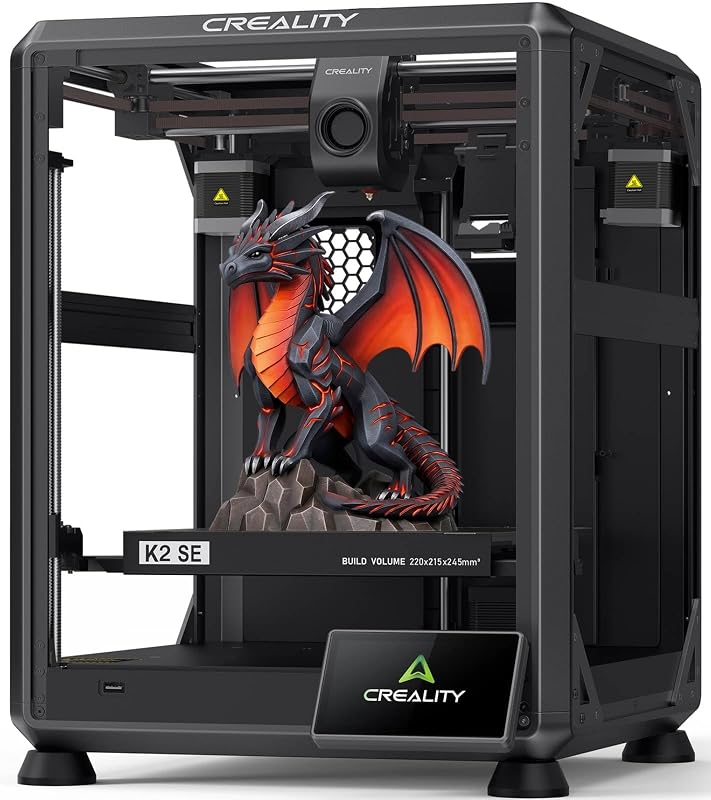
The Creality K2 SE 3D Printer represents Creality’s modern evolution of its enclosed performance platforms, designed as the direct upgrade to the K1 SE machine. For hobbyists weighing which 3d printer to buy when moving on from older generation hardware, the creality k2 se delivers a rock-solid die-cast aluminum alloy frame equipped with corner gussets and dual-side crossbeams. This robust structural rigidity effectively eliminates frame flexing when the lightweight CoreXY motion system accelerates up to 20,000mm/s² and reaches top print speeds of 500mm/s. An integrated vibration sensor and input shaping algorithm actively neutralize mechanical resonance to maintain sharp corners and smooth exterior walls.
Filament driving and extrusion are managed by a modular direct-drive extruder paired with hardened steel dual-drive gears and a quick-swap nozzle mechanism designed to minimize maintenance downtime. Built-in filament run-out detection prevents lost print progress if a spool depletes mid-build. Setup is exceptionally beginner-friendly, requiring just 5 minutes of physical assembly before walking through the touchscreen Quick Guide for one-tap fully automatic bed leveling, fan calibration, and automated first-time tuning. The build envelope measures a generous 220 by 215 by 245 mm, providing substantial volume for mechanical assemblies, functional parts, and detailed multi-component decorative models.
Software control runs on Creality OS, offering seamless compatibility with Creality Print slicing software featuring over 40 filament presets, expert-mode tuning, and Creality Cloud connectivity for wireless multi-printer LAN control from personal computers. Shoppers should note that while the K2 SE is fully engineered to support advanced multi-color printing with automatic filament identification, the Creality CFS multi-color system is sold separately and not included in the base package. With a sturdy metal build measuring 13.98 inches deep, 13.96 inches wide, and 18.98 inches high and weighing 12.5 kg, this printer suits makers who want an ultra-rigid high-speed CoreXY base machine now, with the freedom to add multi-color capabilities down the road.
No. 4 of 4 · Creality
Creality SPARKX i7 Nano Combo Multi‑Color for Beginner Multi-Color Workflows
9.4/10 Our score

Best for: Beginners seeking automated multi-color desktop printing
What the listing says
- Compact Multi-Color Printing for Every Workspace: The Creality SPARKX i7 Nano Combo combines a compact desktop…
- Auto Feed & Retract for Simplified Printing Load filament once and let the printer handle the rest.
- Auto Refill for Longer Print Jobs When a filament spool runs out, the Creality SPARKX i7 Nano Combo automatically switches to a…
- Easy to Start with Auto Leveling & AI Monitoring: Automatic bed leveling helps simplify printer setup…
- Quick-Swap Modular Design Tool-free replacement of the hotend, extruder, and cutter makes routine maintenance faster and easier, helping minimize downtime between prints.
- Create More with the Creality Ecosystem Access thousands of ready-to-print models through Creality Cloud, manage prints remotely over WiFi, and enjoy a connected 3D printing experience.
Pros
- Intelligent Auto Feed and Retract
- Automatic spool refill backup system
- Integrated AI monitoring camera
- Tool-free quick-swap modular hotend
Cons
- Print speed not listed in specifications
- Frame construction material not specified
The Creality SPARKX i7 Nano Combo Multi‑Color is engineered from the ground up as a multi-color 3d printer for beginners that removes the mechanical complexity traditionally associated with multi-spool setups. Built specifically for classrooms, small apartments, studios, and home craft rooms, the creality sparkx i7 combines a compact desktop presence with automated filament management. Its intelligent Auto Feed and Retract system automates the loading and unloading sequence, eliminating manual filament guiding and reducing user intervention during complex multi-shade print jobs. To prevent failed prints during lengthy multi-hour tasks, the system features an Auto Refill function that automatically detects when a spool runs dry and switches immediately to a loaded backup spool.
Operational ease is reinforced by automatic bed leveling that secures first-layer adhesion without tedious manual thumbwheel adjustments. Additionally, the unit features an integrated AI camera that continuously monitors print progress in real time, automatically detecting common printing errors such as layer separation or spaghetti failures to alert users remotely. Routine hardware upkeep is simplified through a quick-swap modular design that allows tool-free replacement of the hotend assembly, extruder, and filament cutter, keeping the printer operational without lengthy teardowns.
Connected to the broader Creality ecosystem via built-in Wi-Fi, the SPARKX i7 Nano Combo allows makers to browse and print thousands of digital designs directly through Creality Cloud while managing jobs remotely from a personal computer. The printer supports standard 3D file formats including STL, OBJ, and G-code. Physical specifications include dimensions of 18.38 inches deep, 16.65 inches wide, and 17.9 inches high, with a total weight of 9.72 kg, making it easy to reposition on a desk. While specific print speeds and structural frame materials are not listed in the specifications, this combo unit stands as the most automation-forward choice for novice makers who prioritize hands-off filament swapping and integrated visual monitoring.
Before you choose
How to Choose the Right UP 3D Printer
Selecting the best modern alternative to an up 3d printer requires evaluating how you plan to manage multi-color filaments, workshop space constraints, and ongoing printer maintenance. The market has shifted dramatically from basic single-material Cartesian systems to automated multi-spool ecosystems. If your priority is maximum color versatility right from the start, compare whether a machine includes multi-color hardware in the package or requires an add-on purchase. The Anycubic Kobra X Multicolor 3D Printer provides native four-color handling out of the box with expansion up to 19 spools, whereas the Creality K2 SE 3D Printer offers a modular path where the Creality CFS multi-color unit is sold separately, allowing users to start with a high-speed CoreXY single-material setup before upgrading.
Motion architecture and print speed represent another vital consideration when browsing modern alternatives. Both the FLASHFORGE AD5X Multi-Material 3D Printer 4-Color and the Creality K2 SE 3D Printer utilize rigid CoreXY motion frames and active vibration suppression or input shaping algorithms. These mechanics allow operating speeds reaching between 500mm/s and 600mm/s with 20,000mm/s² acceleration, producing clean wall finishes on functional prototypes without the mechanical ringing typical of older bed-slinging units. For makers exploring competing ecosystems, checking guides covering alternative multi-material systems like bambu 3d printers can also provide valuable context on current desktop speed standards.
Physical footprint and desktop arrangement matter greatly for makers working in tight quarters, dorms, or shared home offices. The FLASHFORGE AD5X measures a compact 14.8 inches deep by 16.26 inches wide by 14.29 inches high with an organized side-by-side four-spool rack, making it exceptionally easy to fit on shallow workbenches. In contrast, the Anycubic Kobra X uses an innovative top-mount spool holder to minimize its horizontal desk footprint, though its vertical and depth dimensions reach 23 inches deep and 22 inches high. The Creality SPARKX i7 Nano Combo Multi‑Color strikes a practical balance with an 18.38 by 16.65 by 17.9-inch profile and a manageable 9.72 kg weight, making it simple to move around a studio.
Finally, consider the level of automation and routine maintenance you are prepared to handle. Beginners benefit significantly from systems featuring automatic bed leveling, AI failure detection, and automatic filament feeding like those found on the Creality SPARKX i7 Nano Combo Multi‑Color. For long-term hardware health on any high-speed motion rails or lead screws, applying specialized lubricants such as super lube oil for 3d printer guide rods ensures consistent movement and extends mechanical longevity. Matching these automated conveniences against your technical skill level will ensure you select a machine that delivers consistent prints from day one.
Questions people ask
FAQ
Are any of these models manufactured by UP 3D?
No. None of the four models in this roundup are manufactured by the UP brand. The UP 3D printer line was historically known for compact single-extruder desktop machines. Because current additive manufacturing has shifted toward high-speed multi-color printing, this guide reviews the most capable compact multi-filament alternatives currently available from leading manufacturers like Anycubic, Flashforge, and Creality.
Which model is the best multi-color 3d printer for beginners?
The Creality SPARKX i7 Nano Combo Multi‑Color is specifically tailored for novice makers. It eliminates the most common failure points in multi-material printing by incorporating an intelligent Auto Feed and Retract system, automatic spool refill switching when filament runs out, full auto leveling, and an AI monitoring camera that detects print defects before they ruin a build.
Can all of these printers print multi-color right out of the box?
Three of the four models include multi-color hardware directly in the package. The Anycubic Kobra X Multicolor 3D Printer features native four-color handling (expandable up to 19 colors), the FLASHFORGE AD5X includes the Intelligent Filament System for four colors, and the Creality SPARKX i7 Nano Combo includes its multi-color management hardware. In contrast, the Creality K2 SE is multi-color capable, but its Creality CFS unit is sold separately.
What materials can these multi-color printers handle?
Material support varies by hotend and extruder specifications. The Anycubic Kobra X features a 300℃ hardened steel nozzle supporting PLA, PETG, TPU, PVA, and ASA. The FLASHFORGE AD5X supports PLA, TPU, PETG, SILK, and composite blends like PLA-CF and PETG-CF. The Creality K2 SE features hardened steel dual-drive gears and direct drive feeding suitable for rigid and engineering filaments, while the Creality SPARKX i7 Nano Combo handles standard consumer filaments through its modular hotend.
Do these 3D printers come with filament included?
Filament inclusion varies by manufacturer, but you should generally plan to purchase spools separately. For instance, the Anycubic Kobra X listing explicitly states that the filament spools shown in product imagery are for display purposes only and must be purchased separately. Checking your filament inventory before your machine arrives ensures you can begin calibration prints immediately.
Prices, specifications and the feature lines above are read from the product listing and can change without notice. Scores are out of 10, based on listed specifications and buyer feedback; nothing on this page is written from handling the product.


