6 models in this file
Kwikset Touchscreen Locks: WiFi, Z-Wave or Standalone?

As Amazon Associates, we earn from qualifying purchases. This means we may receive a small commission at no extra cost to you if you click through and make a purchase.
Kwikset has long served as an industry anchor in residential access security, earning wide recognition for dependable deadbolt hardware, screwdriver-only DIY installation, and proprietary SmartKey re-keying mechanics. When it comes to digital access, Kwikset touchscreen keypad locks provide reliable key-free entry across multiple operational tiers, from straightforward offline keypads to connected wireless models. Whether outfitting a high-turnover rental home, securing a remote vacation cabin, or keeping daily track of entry logs while traveling for work, the brand delivers consistent door hardware designed to solve key-loss headaches without demanding professional lock technicians.
Across this lineup, Kwikset touchscreen keypad locks divide into three distinct hardware architectures: direct Wi-Fi deadbolts that link directly to your home network without added accessories, Z-Wave 700 long-range models purpose-built for managed hub ecosystems like Ring Alarm and Samsung SmartThings, and self-contained standalone keypads engineered for robust physical security and extended battery preservation without any wireless radios.
The line-up at a glance
Kwikset Touchscreen Keypad Locks Compared
| Model | Connectivity | User Code Capacity | Battery Life | Security Grade / Certification |
|---|---|---|---|---|
| Kwikset Halo Wi-Fi Smart Lock | Wi-Fi (No hub required) | Up to 250 codes | Not listed | Grade AAA Certified, UL Listed |
| Kwikset HomeConnect 918 Contemporary Z-Wave Long | Z-Wave 700 Long Range (Hub required) | Up to 250 codes | At least 12 months (4x AA included) | S2 Encryption |
| Kwikset Halo Select Plus Wi-Fi | Wi-Fi, Matter, NFC | Up to 250 codes | Not listed | Not listed |
| Kwikset SmartCode 270 Keyless Entry Electronic | Standalone (No wireless) | 50 user + 10 one-time codes | At least 12 months (4x AA not included) | Grade 2 BHMA Certified |
| Kwikset HomeConnect 620 Z-Wave Long Range | Z-Wave 700 Long Range (Hub required) | Up to 250 codes | At least 12 months (4x AA included) | S2 Encryption |
| Kwikset Powerbolt 250 10-Button Keypad Satin | Standalone (No wireless) | 25 user + 5 one-time codes | At least 12 months (4x AA not included) | SmartKey Security (KW1) |
No. 1 of 6 · Kwikset
Kwikset Halo Wi-Fi Smart Lock for Direct Cloud Management
8.8/10 Our score

Best for: Remote rental hosts wanting direct Wi-Fi access
What the listing says
- CONTROL FROM ANYWHERE Wi-Fi enabled smart door lock (no hub required), use the Kwikset app to remotely lock and…
- CONVENIENT KEYLESS ENTRY Enable intelligent geofencing to automatically unlock as you approach your home, unlock using the Kwikset app…
- SHARE ACCESS WITH GUESTS Backlit keypad supports up to 250 access codes for keyless entry; use the Kwikset app to…
- SMART HOME INTEGRATION Works with Amazon Alexa or Google Home, control your lock with your voice and create helpful…
- INTRUSION DETECTION Instant notifications in the Kwikset app alert you of any unusual lock activity, including invalid code…
- AUTO-LOCK SECURITY Set a duration for your door to lock automatically after entry or exit for added safety…
Pros
- Direct Wi-Fi with no hub required
- Supports up to 250 access codes
- Grade AAA certified security construction
- Instant intrusion detection app alerts
Cons
- Listing omits estimated battery lifespan
- Limited to doors up to 1-3/4 inches
The Kwikset Halo Wi-Fi Smart Lock is built for homeowners and rental managers who require direct remote access control without the need to set up a dedicated bridge or smart hub. Because the Wi-Fi radio is integrated directly into the lock body, you connect the unit straight to your standard residential Wi-Fi network and control deadbolt operations entirely through the Kwikset app. This layout makes managing vacation check-ins or checking perimeter security from an airport terminal straightforward, as remote locking, remote unlocking, event history reviews, and instant intrusion notifications are handled over the cloud.
For high-turnover rental hosting, the kwikset wifi smart lock hardware supports up to 250 user access codes. Using the companion app, managers can assign permanent credentials to family members or generate scheduled and temporary access codes that expire when a guest checks out. The lock also features intelligent geofencing to unlock as you approach, an auto-lock function that secures the bolt after entry or exit, and an intrusion detection alarm that triggers alerts in the app when unusual lock tampering or repeated invalid PIN entries occur.
Physically, the kwikset halo touchscreen deadbolt features a matte black aesthetic with a Grade AAA certification and a UL listing, delivering verified mechanical resistance against forced entry. Installation requires only a standard screwdriver to fit doors between 1-3/8 inches and 1-3/4 inches thick, accommodating an adjustable backset from 2-1/8 inches to 2-3/4 inches. Supported smart voice platforms include Amazon Alexa and Google Home for voice-guided deadbolt checks. While the listing does not specify battery lifespan expectations, the package includes a lifetime mechanical and finish warranty alongside a 1-year electronics warranty.
No. 2 of 6 · Kwikset
Kwikset HomeConnect 918 Contemporary Z-Wave Long for Smart Home Hubs
8.8/10 Our score

Best for: Ring Alarm and SmartThings hub ecosystems
What the listing says
- CONVENIENT KEYLESS ENTRY Touchscreen entry makes coming and going secure and simple.
- Z-WAVE 700 LONG RANGE WHOLE HOME COVERAGE: Z-Wave Long Range provides a direct connection to your…
- ENHANCED SECURITY AND SEAMLESS INTEGRATION Advanced Z-Wave security with S2 encryption, protecting from hackers.
- RING ALARM COMPATIBLE Control and check the status of your Kwikset HomeConnect 918 directly through the Ring Alarm system…
- EASY CODE MANAGEMENT Customize up to 250 user codes and 1 programming code that lets you edit or delete…
- AUTO-LOCK Enjoy security and peace of mind knowing your door will lock itself on a set schedule.
Pros
- Z-Wave 700 Long Range transmission
- 12-month battery life with included batteries
- S2 security encryption and SmartStart
- Manages 250 user codes via hub
Cons
- Requires compatible Z-Wave hub
- No direct Wi-Fi connectivity
The Kwikset HomeConnect 918 Contemporary Z-Wave Long is engineered for property owners who already maintain or plan to deploy a centralized smart home or security ecosystem. Operating on Z-Wave 700 Long Range protocol, the kwikset homeconnect 918 establishes a secure, point-to-point connection with compatible systems such as Samsung SmartThings or Ring Alarm. Because it communicates via Z-Wave rather than power-intensive Wi-Fi, it drastically reduces transmission load, allowing the four included AA alkaline batteries to deliver at least 12 months of operating life.
Connecting the deadbolt to a Ring Alarm smart hub lets users monitor lock status, automate security modes, and operate the deadbolt straight from the Ring application. Integration is simplified through SmartStart technology, which enables seamless pairing with your Z-Wave controller, while S2 encryption protocols shield the lock against signal interception or unauthorized interference. Code management accommodates up to 250 unique user credentials alongside a master programming code, permitting property owners to create, edit, or remove codes directly through the hub interface.
The hardware includes customizable auto-lock intervals that can be set for 30 seconds, 1 minute, 3 minutes, 5 minutes, or 10 minutes, securing the perimeter automatically even if departing visitors forget to engage the lock manually. The contemporary matte black deadbolt fits door slabs ranging from 1-3/8 inches to 2 inches in thickness, featuring an adjustable backset spanning 2-3/8 inches to 2-3/4 inches. The full kit includes the exterior touchscreen deadbolt, interior assembly, mounting hardware, installation guide, and four AA batteries.
No. 3 of 6 · Kwikset
Kwikset Halo Select Plus Wi-Fi for Apple Home and Matter Ecosystems
9.0/10 Our score

Best for: Apple Home users wanting Matter tap-to-unlock
What the listing says
- TAP TO UNLOCK With NFC technology and Apple home keys, simply tap to unlock Halo Select Plus using your…
- CONTROL AND MONITOR FROM ANYWHERE Remotely lock and unlock, share guest access and ensure your door
- SMART HOME INTEGRATION Works with Amazon Alexa, Apple Home and Google Home.
- CONVENIENT KEYLESS ENTRY Enable intelligent geofencing to automatically unlock as you approach your home, unlock using the Kwikset app…
- EASY, SECURE GUEST ACCESS Share up to 250 temporary, scheduled or permanent access codes with family and trusted guests
Pros
- NFC Apple home keys tap-to-unlock
- Native Matter smart home integration
- Direct Wi-Fi remote management
- Stores 250 guest access codes
Cons
- Listing omits battery life specifications
- Door thickness specs omitted
The Kwikset Halo Select Plus Wi-Fi advances digital deadbolt integration by combining direct Wi-Fi networking with the universal Matter smart home standard. Unlike conventional connected locks, the kwikset halo select plus incorporates Near Field Communication (NFC) hardware supporting Apple home keys. This allows iPhone and Apple Watch owners to unlock their door simply by tapping their device against the touchscreen faceplate, eliminating the need to type numbers into a keypad or load an external application when returning home with luggage.
Because the deadbolt incorporates native Matter integration, it functions natively alongside Amazon Alexa, Google Home, and Apple Home, allowing cross-platform automations without brand-specific workarounds. Remote locking, geofenced automatic unlocking, and guest access delegation are all handled over Wi-Fi. Hosts can store up to 250 temporary, scheduled, or permanent entry codes for family members and service contractors, making remote oversight seamless when traveling outside the country. Shoppers exploring alternatives like the yale smart lock wifi will find the Kwikset model provides broad ecosystem compatibility without proprietary hub requirements.
Constructed from durable metal with dimensions measuring 4.19 by 5.44 by 9.88 inches, the deadbolt provides built-in alarms, passcode unlocking, one-touch locking, and programmable auto-locking. The product listing does not specify exact door thickness tolerances or anticipated battery operational longevity. It remains the top pick in Kwikset’s connected portfolio for tech-forward users immersed in Apple Home or mixed Matter automation environments.
No. 4 of 6 · Kwikset
Kwikset SmartCode 270 Keyless Entry Electronic for Heavy-Duty Standalone Security
8.2/10 Our score

Best for: High-security doors without wireless network connections
What the listing says
- CONVENIENT KEYLESS ENTRY Touchpad entry makes coming and going secure and simple.
- CERTIFIED ADVANCED SECURITY Security, Durability and Finish are Grade 2 BHMA certified, which is up to 2.5x stronger than…
- AUTO-LOCK Enjoy security and peace of mind knowing your door can lock itself.
- 12-MONTH BATTERY LIFE Battery lasts at least 12 months, giving you more time in between battery replacements.
- EASY CODE MANAGEMENT Customize up to 50 user codes, 10 one-time user codes and 1 programming code that lets…
- EASY INSTALL AND BILT APP Installs with just a screwdriver.
Pros
- BHMA Grade 2 certified durability
- Vacation Mode disables keypad entirely
- Includes 10 single-use temporary codes
- 12-month expected battery life
Cons
- Four AA batteries not included
- No wireless remote management
The Kwikset SmartCode 270 Keyless Entry Electronic deadbolt is designed specifically for users who want keyless push-button simplicity without managing wireless configurations, Wi-Fi passwords, or smart home hubs. The kwikset smartcode 270 focuses squarely on physical deadbolt security and straightforward local management, featuring a certified Grade 2 BHMA build that is rated up to 2.5 times stronger than standard Grade 3 locksets against forced impacts, daily mechanical wear, and outdoor weather exposure.
Credential storage on the SmartCode 270 supports up to 50 primary user codes, 10 single-use temporary codes, and a master programming code used to alter or erase access PINs locally. The single-use codes are particularly beneficial for hosts who need to grant one-time access to maintenance workers, cleaners, or delivery staff while away on trips; once entered, the code immediately invalidates itself. For added security, an intrusion alert sounds and initiates a 60-second keypad lockout after three consecutive incorrect entries. If you are taking extended trips, activating the built-in Vacation Mode entirely disables the touchpad, ensuring that the deadbolt cannot be operated by any electronic passcode until the feature is manually deactivated.
Installation is guided by 3D interactive animations via the BILT application, requiring only a screwdriver to fit onto standard prep doors. The lock operates on four AA alkaline batteries (which are not included) that provide an estimated lifespan of at least 12 months. Integrated auto-lock timings can be programmed for 30 seconds, 1 minute, 3 minutes, 5 minutes, or 10 minutes. While shoppers looking for complete lock-and-grip hardware sets might cross-shop a schlage keypad door lock with handle, the SmartCode 270 functions as a dedicated electronic deadbolt that includes physical backup keys and a SmartKey re-key tool.
No. 5 of 6 · Kwikset
Kwikset HomeConnect 620 Z-Wave Long Range for Traditional Hub Integration
9.2/10 Our score

Best for: Classic home exteriors connected via Z-Wave
What the listing says
- CONVENIENT KEYLESS ENTRY Touchscreen entry makes coming and going secure and simple.
- Z-WAVE 700 LONG RANGE WHOLE HOME COVERAGE: Z-Wave Long Range provides a direct connection to your…
- ENHANCED SECURITY AND SEAMLESS INTEGRATION Advanced Z-Wave security with S2 encryption, protecting from hackers.
- RING ALARM COMPATIBLE Control and check the status of your Kwikset HomeConnect 918 directly through the Ring Alarm system…
- EASY CODE MANAGEMENT Customize up to 250 user codes and 1 programming code that lets you edit or delete…
- AUTO-LOCK Enjoy security and peace of mind knowing your door will lock itself on a set schedule.
Pros
- Z-Wave 700 Long Range coverage
- Batteries included with 12-month life
- Backlit keypad with illuminated buttons
- Supports 250 programmable credentials
Cons
- Requires separate Z-Wave smart hub
- Lacks direct native Wi-Fi connection
The Kwikset HomeConnect 620 Z-Wave Long Range deadbolt brings modern Z-Wave smart security to doors that require classic, ornate architectural hardware. Finished in traditional Venetian Bronze, the kwikset homeconnect 620 features a backlit keypad layout with tactile buttons, a dedicated one-touch lock button, and an integrated battery life indicator light. Powered by Z-Wave 700 Long Range technology, it delivers broad transmission reach across large properties and outbuildings, maintaining direct communication with compatible hubs such as SmartThings and Ring Alarm.
Operating through a Ring Alarm smart hub, property managers can view current bolt status, trigger remote unlocking, and verify visitor arrival times via the central security interface. Security is reinforced via S2 encryption standards and SmartStart barcode pairing, guarding communication signals from unauthorized interception. The lock supports 250 programmable access credentials along with a master programming code, permitting wide-ranging credential management for remote rental properties.
The internal drive mechanism provides automated locking schedules configured for intervals of 30 seconds, 1 minute, 3 minutes, 5 minutes, or 10 minutes. Powered by four included AA alkaline batteries, the deadbolt provides at least 12 months of operation before battery replacement is required. It delivers an optimal balance for users who require long-distance hub wireless connectivity without altering the classic, warm exterior aesthetic of their entryway.
No. 6 of 6 · Kwikset
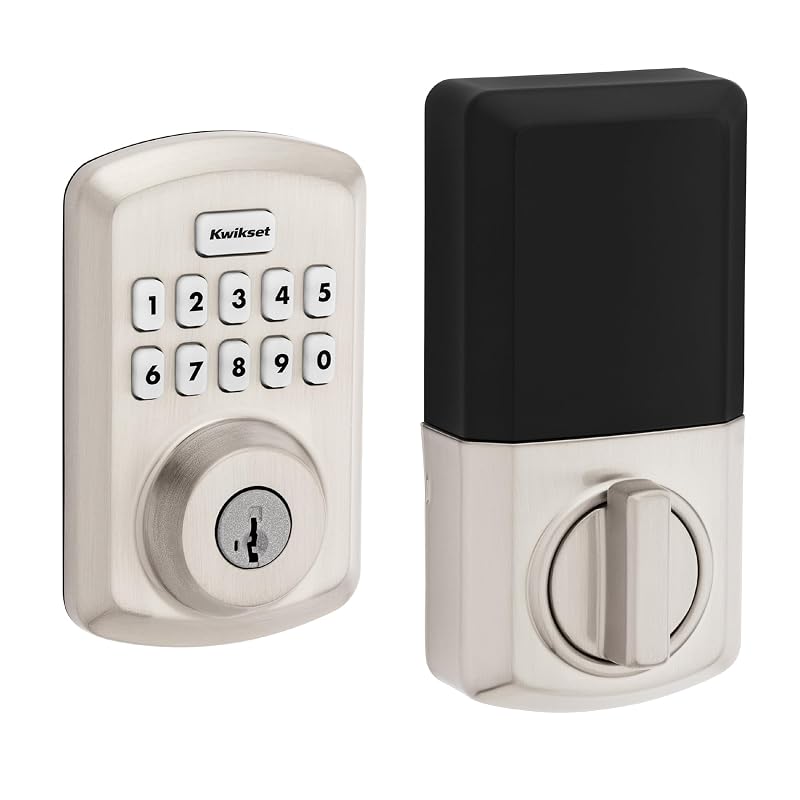
Kwikset Powerbolt 250 10-Button Keypad Satin for Budget-Friendly Keyless Entry
8.2/10 Our score
Best for: Simple side doors and budget keyless security
What the listing says
- CONVENIENT KEYLESS ENTRY Keypad entry makes coming and going secure and simple.
- EASY CODE MANAGEMENT Customize up to 25 user codes, 5 one-time user codes and 1 programming code that lets…
- AUTO LOCK Enjoy security and peace of mind knowing your door can lock itself.
- INTRUSION ALERT After 3 consecutive incorrect code entries, the lock sounds an alarm and disables the keypad for…
- EASY LOW LIGHT CODE ENTRY Bright LED lights illuminate the keypad so you can easily enter your user code at night.
- VACATION MODE Activate Vacation Mode to temporarily disable the keypad, and feel safe knowing no one can operate…
Pros
- SmartKey re-keying to KW1 keys
- Vacation Mode disables code access
- Five single-use guest codes included
- Bright LED backlit keypad
Cons
- Capacity capped at 25 multi-use codes
- Four AA batteries not included
The Kwikset Powerbolt 250 10-Button Keypad Satin deadbolt provides reliable, keyless electronic security focused entirely on standalone entry without wireless complexity. Designed with a transitional satin nickel housing, the kwikset powerbolt 250 features a responsive 10-button keypad illuminated by bright LED backlights that activate with a single tap, making nighttime code entry quick and visible on unlit porches or side entries.
Code capacity on the Powerbolt 250 includes up to 25 user codes, five single-use guest codes, and one master programming code. For property owners who travel frequently, the five one-time codes offer an efficient method for letting service personnel or neighbors inside without sharing permanent family passcodes. The lock also includes a dedicated Vacation Mode setting that locks out all digital keypad operations while you are away from the home. If an unauthorized user attempts three consecutive invalid codes, a built-in alarm sounds and disables the keypad for 60 seconds to deter tampering.
Mechanical reliability is anchored by Kwikset SmartKey security, which protects the physical cylinder from advanced forced break-in techniques and allows owners to re-key the deadbolt to any standard KW1 key in seconds using the included reset tool. The lock runs on four AA alkaline batteries (not included) that deliver an estimated 12 months of service life. Homeowners exploring simple perimeter security upgrades or pairing their deadbolt with a kwikset keyless entry door knob will find the Powerbolt 250 an accessible, screwdriver-installed electronic upgrade for side doors, garage entries, and residential perimeters.
Before you choose
How to Choose the Right Kwikset Touchscreen Keypad Locks
Selecting the right model from this lineup requires matching your preferred wireless architecture, code volume, and maintenance schedule to your lifestyle. When planning a kwikset keypad lock comparison, the primary deciding factor is whether you want direct cloud access, managed smart hub integration, or a completely standalone security setup.
- Direct Wi-Fi Connectivity: If you manage a vacation rental or travel frequently and need to check access logs, create guest codes, and lock or unlock the door from anywhere in the world without purchasing additional bridge hardware, choose the Kwikset Halo Wi-Fi Smart Lock or the Kwikset Halo Select Plus Wi-Fi. The Select Plus adds Matter and Apple home key support, making it ideal for users embedded in the Apple Home ecosystem.
- Z-Wave Smart Home Hubs: If your residence already operates on an integrated security system like Ring Alarm or Samsung SmartThings, the Kwikset HomeConnect 918 Contemporary or HomeConnect 620 Traditional are optimal choices. Using Z-Wave 700 Long Range technology, these models preserve battery life for at least 12 months and maintain extended transmission distance to detached garages and outbuildings, though they require a compatible Z-Wave hub (sold separately).
- Standalone Offline Security: If you want key-free access without handling Wi-Fi configurations, app updates, or hub setups, standalone deadbolts are the most dependable choice. When deciding which kwikset keypad lock to buy for unmonitored security, the Kwikset SmartCode 270 provides heavy-duty Grade 2 BHMA durability and 50 user codes, while the Kwikset Powerbolt 250 offers 25 user codes, LED backlighting, and SmartKey re-keying at an accessible entry point.
- Access Code Needs and Guest Turnover: High-volume properties benefit from the 250-code capacity found on the Halo and HomeConnect series. Standalone options offer smaller banks (50 on the SmartCode 270, 25 on the Powerbolt 250), but both standalone models include single-use temporary codes that automatically deactivate after one entry, making them ideal for infrequent service visits.
- Battery Maintenance and Travel Readiness: Z-Wave and standalone models explicitly provide at least 12 months of battery life on four AA batteries. For frequent travelers, both the SmartCode 270 and Powerbolt 250 feature dedicated Vacation Modes that completely shut down the keypad while you are away, eliminating unauthorized keypad attempts until you return.
Questions people ask
FAQ
Can Kwikset touchscreen locks connect to Wi-Fi without a separate bridge?
Yes. The Kwikset Halo Wi-Fi Smart Lock and Kwikset Halo Select Plus Wi-Fi feature built-in Wi-Fi radios that connect directly to standard residential home networks. They do not require a secondary hub or bridge, allowing owners to remotely lock, unlock, check entry history, and manage visitor codes straight from the Kwikset smartphone application.
What is the difference between Z-Wave models and direct Wi-Fi smart locks?
Direct Wi-Fi models communicate straight to cloud servers over your home router, offering standalone mobile app control from any location. Z-Wave models, like the Kwikset HomeConnect 918 and HomeConnect 620, communicate over low-power radio frequencies directly to a central smart home hub, such as Ring Alarm or Samsung SmartThings. While Z-Wave locks require that separate hub to enable app control, they draw significantly less power, helping the included AA batteries last for at least 12 months.
How does Vacation Mode protect a property while traveling?
Vacation Mode is an offline security feature found on models like the Kwikset SmartCode 270 and Kwikset Powerbolt 250. When activated prior to leaving on a trip, Vacation Mode completely disables the external keypad. This prevents any electronic code from unlocking the deadbolt, ensuring that unauthorized visitors or code guessers cannot gain entry electronically while you are out of town.
What does Kwikset SmartKey security provide?
SmartKey security is a proprietary mechanical cylinder feature included on models like the Kwikset Powerbolt 250 and SmartCode 270. It provides enhanced physical resistance against advanced break-in techniques. Additionally, it allows property owners to re-key the physical lock cylinder to any standard KW1 keyway in seconds using the provided SmartKey learn tool, avoiding the expense of replacing deadbolts when re-keying locks.
What happens if the batteries drain completely while the homeowner is away?
All electronic deadbolts featured in this lineup retain physical keyway cylinders as a failsafe. If the four AA alkaline batteries run completely out of charge while you are traveling, the deadbolt can still be unlocked manually using the physical keys provided in the package. Standalone models like the SmartCode 270 and HomeConnect 620 also provide low-battery indicator lights to alert you well before the power is depleted.
Prices, specifications and the feature lines above are read from the product listing and can change without notice. Scores are out of 10, based on listed specifications and buyer feedback; nothing on this page is written from handling the product.


