3 models in this file
How to Emboss With Cricut: Tips and Kits That Do It

As Amazon Associates, we earn from qualifying purchases. This means we may receive a small commission at no extra cost to you if you click through and make a purchase.
Crafters searching for a dedicated cricut embossing machine often discover that Cricut approaches dimensional texture and decorative relief through modular tooling rather than separate, bulky tabletop hardware. Instead of requiring you to store, pack, and transport an entirely separate manual roller press or heavy electric texture device, the brand integrates specialized tool heads directly into the existing adaptive carriage of its cutting plotters. This modular design offers massive practical advantages for mobile crafters, travelers, and workshop minimalists who need to keep their travel cases light and organized. By utilizing interchangeable housings and tips, a single compact machine base can cut intricate patterns, score sharp folds, deboss detailed dimensional designs, and apply gleaming metallic foil accents without demanding extra luggage space or additional power outlets.
While all three options featured in this guide expand your tactile crafting capabilities, they differ significantly in mechanical execution: the Cricut Foil Transfer Kit delivers shimmering metallic embellishment via pressure across both Maker and Explore plotters, whereas the Cricut Fine Debossing Tip and the UCEC Fine Debossing Tip+Drive Housing 21 employ rolling spheres mounted in QuickSwap-style drive housings exclusively for Maker machines to press crisp, physical indentations into cardstock, leather, and specialty craft boards.
The line-up at a glance
Cricut Embossing and Debossing Tools Compared
| Product | Machine Compatibility | Operation Mechanism | Drive Housing Included | Supported Materials |
|---|---|---|---|---|
| Cricut Foil Transfer Kit | Cricut Maker, Cricut Explore | Pressure-activated foil transfer | Yes (dedicated foil housing) | Cardstock, paper, invitations, gift boxes |
| Cricut Fine Debossing Tip | Cricut Maker | Ceramic rolling debossing ball | Yes (QuickSwap housing) | Coated paper, duct tape sheet, shimmer paper, glitter paper, foil cardstock |
| UCEC Fine Debossing Tip+Drive Housing 21 | Cricut Maker, Maker 3, Maker 4 | Alloy steel rolling debossing ball | Yes (Drive housing 21) | Cardstock, leather, poster board, kraft board, craft foam, fabric, foil board |
No. 1 of 3 · Cricut
Cricut Foil Transfer Kit for Glimmering Surface Accents
4.6 Amazon buyer average
Best for: Crafters wanting heat-free metallic card embellishments
What the listing says
- MAKE YOUR PROJECTS SHINE – Customize thank you cards, birthday cards, or invites with the Cricut Foil Transfer Kit.
- EMBELLISH WITH EASE – This foil transfer kit allows you to adorn your invites, gift boxes,…
- WHAT’S INSIDE – The kit contains 12 Cricut Foil Transfer Sheets (6 each) Gold & Silver…
- COMPATIBLE WITH CRICUT MACHINE – The tool kit is compatible with the Cricut Maker and Cricut Explore cutting machines.
- BEAUTIFUL PROJECTS RIGHT IN YOUR HOME – Cricut accessories are designed to help make crafting and…
Pros
- Three interchangeable tip widths
- Includes twelve foil sheets
- Works without heat or cords
- Maker and Explore compatible
Cons
- Produces flat foil rather than deep grooves
- Requires manual taping of sheets
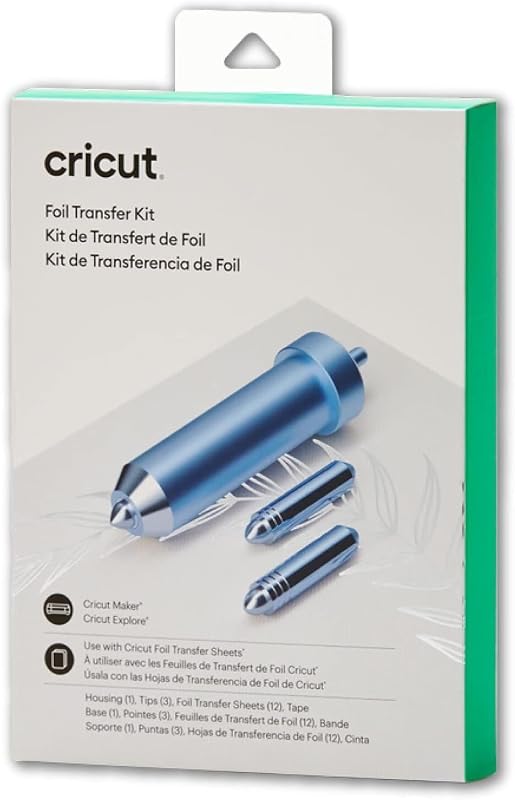
The Cricut Foil Transfer Kit is a 3-in-1 crafting system designed to add polished metallic shine directly to paper crafts without relying on electrical heating elements, cords, or messy adhesives. For mobile crafters and event planners making custom stationery on location, eliminating heat is a major benefit. Heat-based foil pens and hot-stamping units require warm-up intervals, heavy power adapters, and safe resting stations that complicate temporary workspaces. In contrast, this kit relies strictly on mechanical downward pressure exerted by the cutting carriage, allowing you to produce luminous invitations, customized thank-you notes, and decorative gift boxes anywhere your machine has a flat surface.
Manufactured under model number 2008726 by Provo Craft & Novelty, the complete package includes a dedicated foil tool housing, three interchangeable tips labeled fine, medium, and bold, adhesive transfer tape, and twelve 4-inch by 6-inch foil sheets split evenly between gold and silver. The user secures the foil sheet over the base project material using the included tape, inserts the appropriate tip into the housing, and lets Design Space software coordinate the pressure strokes. Because the kit contains three distinct tip widths, you can tailor your lines from delicate calligraphic strokes to wide, lustrous decorative fills on gift tags and card faces.
This embellishment tool is uniquely versatile because it works with both Cricut Maker and Cricut Explore cutting machines. If you own an Explore series unit and want surface accents that resemble hot-foil stamping without buying an entirely new plotter or a standalone press during a cricut clearance sale, this kit is your primary option. Keep in mind that while it creates high-luster visual effects, it does not produce deep, tangible grooves in thick boards; its role is surface foiling rather than deep tactile embossing.
No. 2 of 3 · Cricut
Cricut Fine Debossing Tip for Crisp Dimensional Impressions
4.3 Amazon buyer average

Best for: Maker owners seeking crisp detailed paper debossing
What the listing says
- PERSONALIZE YOUR CRAFTS – Add professional polish and elevated elegance with the Cricut Fine Debossing Tip…
- EFFICIENT DEBOSSING TOOL – Unlike folders, the ceramic rolling debossing tip, with a wider range of…
- COMPATIBLE WITH CRICUT MACHINE – The debossing tip is compatible with the Cricut Maker cutting machine…
- NUMEROUS DEBOSSING OPTIONS – This debossing tool for Cricut Maker works on coated paper, duct tape…
- BEAUTIFUL PROJECTS RIGHT IN YOUR HOME – Cricut accessories are designed to help make crafting and…
Pros
- Ceramic rolling debossing ball
- QuickSwap housing included
- Freeform designs without folders
- Gentle on shimmer and glitter paper
Cons
- Incompatible with Explore machines
- Only one debossing tip size included
The Cricut Fine Debossing Tip brings true tactile relief to craft projects by utilizing a specialized rolling ceramic ball that glides across materials under controlled downforce. Unlike traditional manual craft setups that force you to sandwich paper inside rigid plastic folders, this digital tool gives you total creative freedom. The rolling sphere follows vector paths generated in Design Space, allowing you to position intricate flourishes, monogram seals, logos, and custom borders anywhere on a sheet without being constrained by the fixed dimensions or predetermined designs of physical folders.
Identified by model number 2006835, this official accessory arrives paired with Cricut’s QuickSwap Housing. The QuickSwap mechanism is engineered for maximum creative flexibility, letting you depress a top plunger to swap out the debossing head for other compatible accessories such as engraving tools, scoring wheels, perforation blades, or wavy cutters. According to its listing specifications, the fine debossing tip excels on a diverse array of specialty craft substrates, including coated paper, duct tape sheets, shimmer paper, glitter cardstock, and reflective foil cardstock. The smooth rolling action compresses the material fibers without tearing the delicate top coatings, leaving clean, pro-level debossed contours that elevate handmade cards.
Because the rolling ball requires the adaptive drive mechanism of the Cricut Maker cutting machine, it cannot be operated in Cricut Explore units. For Maker owners who want to abandon heavy manual folder presses like a traditional sissex die cutting machine to save storage space and travel light, this tool represents a compact, highly precise solution. It creates crisp, indented debossed patterns on wedding invitations, product packaging, and customized paper craft items without adding bulk to your mobile tool kit.
No. 3 of 3 · UCEC
UCEC Fine Debossing Tip+Drive Housing 21 for Heavy-Duty Maker Texturing
4.2 Amazon buyer average

Best for: Makers debossing dense kraft board and leather
What the listing says
- Crisp, Detailed Debossed Designs Create clean, elegant, and detailed debossed patterns with this compatible with Cricut debossing tip.
- Compatible with Maker Series Machines: Made for machines compatible with Cricut Maker 4, Maker 3, and Maker.
- Smooth Rolling Tip for Fine Detail: Designed with a smooth rolling debossing ball, this debossing tip…
- Versatile Craft Material Options This compatible with Cricut embossing tool works on coated paper, adhesive sheets, glitter paper, shimmer paper,…
- Tip + Drive Housing Included Includes one fine debossing tip and one drive housing.
Pros
- Durable alloy steel construction
- Drive housing included
- Broad support for leather and foam
- Rust-resistant polished rolling tip
Cons
- Not compatible with Explore series
- Third-party manufactured accessory
The UCEC Fine Debossing Tip+Drive Housing 21 provides a rugged, aftermarket alternative for crafters seeking a debossing tip compatible with cricut Maker series machines. Constructed from durable metal with alloy steel handle and blade components, this accessory focuses on structural longevity and steady rotational movement. For traveling crafters who work in pop-up booths, collaborative studios, or classroom environments, having a durable steel drive housing and rolling tip ensures consistent performance even when processing abrasive or dense materials over extended production runs.
Cataloged as model UCEC_UCEC00951, this two-piece assembly includes both the drive housing and a precision fine debossing tip. The rolling sphere mechanism features a polished, rust-resistant finish engineered to roll smoothly across intricate vectors, monograms, text, and decorative borders. Listing details highlight compatibility across a remarkably wide range of crafting media, specifying performance on coated paper, adhesive sheets, glitter paper, shimmer paper, foil cardstock, standard cardstock, foil poster board, kraft board, heavy poster board, leather, paper, craft foam, plastic, and fabric. This broad material reach makes it appealing for makers producing textured leather key fobs, custom book covers, and heavy packaging.
Compatibility is limited to the Cricut Maker line, specifically listing support for Maker, Maker 3, and Maker 4 machines while excluding the Explore family entirely. The included drive housing features QuickSwap-style interchangeability, allowing crafters to snap in other modular tips such as wavy or scoring tools. If you use your cricket craft machine for heavy-duty papercrafts and mixed-media projects that demand rigid metal tooling, this set offers a complete housing-and-tip package ready for intense workshop use.
Before you choose
How to Choose the Right Cricut Embossing and Debossing Tools
Selecting the right accessory depends first and foremost on the specific cutting machine you own. If you craft on a Cricut Explore model, your machine lacks the adaptive gear drive required to turn QuickSwap housings or exert extreme localized downward force with rolling balls. For Explore users, the Cricut Foil Transfer Kit is the only supported option among these three, giving you brilliant surface embellishment within the standard tool carriage. Conversely, Cricut Maker owners possess the dual-gear drive system necessary to run both the Foil Transfer Kit and rolling debossing tips, giving them access to the full spectrum of surface techniques.
Next, determine whether your aesthetic requires metallic shine or physical dimensional relief. The foil transfer kit does not press deep structural grooves into your paper; instead, it uses pressure to bond a thin, reflective metallic layer onto the surface. This technique produces stunning reflective stationery, holiday cards, and gift packaging that mimic traditional foil stamping. However, if your goal is tactile texture—such as raised or indented monograms, leather borders, or quilted paper patterns—you need a dedicated debossing tool. The rolling ball heads push deep into paper fibers, leaving tangible channels that can be felt by hand.
Material selection also guides which cricut embossing tool to buy. The official Cricut Fine Debossing Tip is thoroughly optimized for coated papers, duct tape sheets, glitter papers, and foil cardstock, ensuring that fine decorative designs do not crack or tear specialty finishes. If your projects involve heavier, more demanding substrates like genuine leather, craft foam, thick poster board, or dense kraft board, the UCEC Fine Debossing Tip+Drive Housing 21 explicitly lists support for these heavier media, aided by its all-metal alloy steel construction.
Finally, consider your storage constraints and workflow portability. Crafters who travel to workshops, crop weekends, or outdoor craft fairs need to minimize tool volume. Packing a collection of traditional plastic embossing folders and a manual hand-crank press consumes significant tote bag space and adds substantial carrying weight. By utilizing digital cricut maker embossing tools, your texture patterns are stored virtually on your laptop or tablet in Design Space. You only need to slip a tiny drive housing or foil tip set into your accessory pouch, keeping your entire mobile studio streamlined and lightweight.
Questions people ask
FAQ
Is there a dedicated standalone Cricut embossing machine?
No, Cricut does not currently manufacture a standalone, dedicated electric embossing machine. Instead, Cricut incorporates debossing and foiling capabilities into its smart cutting machines through modular tool accessories. By inserting the Cricut Fine Debossing Tip, the UCEC drive housing, or the Cricut Foil Transfer Kit into your existing cutter, you transform a single digital plotter into a texturing and embellishing workstation without buying extra heavy equipment.
What is the difference between embossing and debossing with Cricut tools?
Embossing creates a raised, three-dimensional design that stands proud of the front surface of your material, whereas debossing depresses the design downward to create an indented, recessed channel. Because Cricut machines roll across the top surface of a material secured to an adhesive cutting mat, the rolling tip compresses fibers downward, technically producing a debossed effect. Crafters can achieve a raised embossed look simply by placing their cardstock face-down on the mat and mirroring their design in Design Space prior to running the tool.
Can the Cricut Explore use the Cricut fine debossing tip?
No, the Cricut Fine Debossing Tip is strictly incompatible with Cricut Explore models. The fine debossing tip requires Cricut’s proprietary QuickSwap drive housing, which connects directly to the motorized gear mechanism found exclusively in the adaptive tool system of Cricut Maker machines. Explore machines use a different tool clamp mechanism that cannot regulate the necessary rotational movement or pressure for rolling debossing spheres.
How does the Cricut foil transfer kit work without heat or electricity?
The Cricut Foil Transfer Kit uses a specialized pressure-sensitive system rather than thermal activation. The included transfer foil sheets feature a release layer that transfers metallic pigment onto the base cardstock when subjected to precise mechanical pressure. The machine carriage drives the fine, medium, or bold metal tip across the taped foil sheet, pressing the reflective finish onto the paper without requiring heating elements, power cords, or battery packs.
Can you swap different tip heads into the QuickSwap and UCEC drive housings?
Yes, both the official QuickSwap housing and the UCEC drive housing feature interchangeable tip mechanisms. Crafters can press the plunger located at the top of the housing to release the debossing tip and replace it with compatible tools, such as engraving tips, single scoring wheels, double scoring wheels, wavy blades, and perforation blades. This interchangeable system minimizes the number of bulky tool bodies you need to pack when traveling.
Prices, specifications and the feature lines above are read from the product listing and can change without notice. Every score is the average rating Amazon buyers left for that item; nothing on this page is written from handling the product.